Adaptive AI coaching and daily tracking for routine-driven fitness users
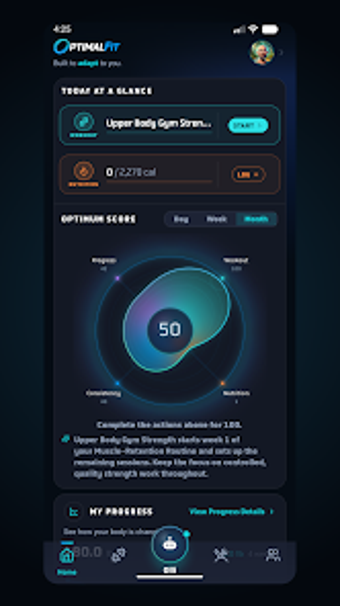
Creates evolving multi-week training and nutrition plans that change based on your progress, equipment, and schedule, with an in-app AI coach that adjusts targets in real time. OptimalFit, from OptimalFit, sits in the health-fitness category on Android and merges workouts, meal logging, and body-composition charts into one hub. It fits disciplined exercisers and busy planners who need programs that bend around missed sessions and varying gym setups.
How the coach adapts when your week goes off plan
The app uses an AI assistant, Olli, to rewrite daily plans when circumstances change, performing real-time exercise swaps and macro adjustments according to the provided material. That adaptive behaviour uses your history and available equipment to change multi-week programs rather than delivering fixed PDFs. For someone juggling travel, shift work, or inconsistent gym access, the coach updates targets and exercises on the fly based on logged performance.
How it connects with devices and imports health data
OptimalFit supports a read-only sync with Health Connect to import steps, sleep, and biometric metrics, so the app centralizes external device data into its analytics. The tool reports body composition trends and training volume charts by combining internal logs with synced readings, which helps keep a single, consolidated record instead of scattered apps or spreadsheets.
How daily logging and guided sessions behave in practice
Guided workouts include timers, supersets, and circuits, and set-by-set logging works offline, so you can track sessions in low-connectivity gym environments. Meal logging accepts barcode scans, photos, or text descriptions, letting food entries match the same session rhythm as training entries. The app aggregates those inputs into progress analytics that show weight, body-fat percentage, and lean mass trends over time.
How privacy and community features affect everyday use
The app offers a no-account mode for local-only tracking, keeping data on-device unless you opt in; community features are optional and focused on verified "receipts" rather than casual posts. That design lets users choose an isolated tracking workflow or an opt-in social layer that shares proof-backed stat cards with others, depending on daily preference for privacy or public accountability.
To sum up, a fit option for planners who need adaptive coaching
To sum up, OptimalFit suits committed users who want structured progression that bends around real life, offering clear data consolidation and flexible logging. Consider that some advanced functions require an active membership to unlock full functionality; choose the app if you need evolving programs tied to your recorded progress, and skip it if you prefer fixed, unchanging plans.